©2023 CTESC, Inc. CTESC Internet Services is a wholly owned subsidiary of Central Texas Electric Co-


24 Hour Technical Support (888) 326-
Fredericksburg Office
Local (830)992-
Toll Free (888)297-



High-
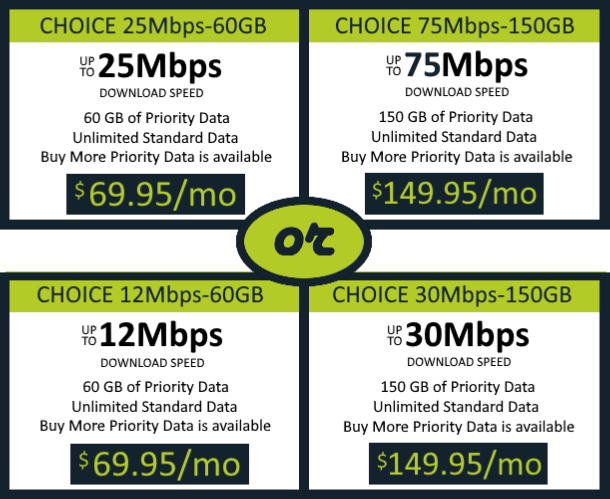
Starting at $69.95
Choice 75-150 or 30-150
Download speeds up to 75 or 30 Mbps and 150 GB of High-
Able to “Buy More” High-
GOOD FOR: Families with many connected devices; people who want the best quality regardless of the device they use; people who watch video on big-
Choice 25-60 or 12-60
Download speeds up to 25 or 12 Mbps and 60 GB of High-
Able to “Buy More” High-
GOOD FOR: Smaller households that don’t use many connected devices; people who mostly tend to stream videos on their phone or tablet.
Able to “BUY MORE” High-Speed Data!
The ability to purchase additional High-


CTEC
Central Texas Electric Co-
CTEC provides electric service in 11 counties: Gillespie, Llano, Mason, San Saba, Blanco, Kendall, Kerr, Real, Kimble, Menard and McCulloch.
Besides the headquarters office in Fredericksburg, branch offices are conveniently located in Mason, Llano, and Kingsland, Texas.

CTEC offices are open 8:00 a.m. to 5:00 p.m., Monday – Friday. All CTEC offices have payment drive-
Fredericksburg, Texas (Headquarters)
386 Friendship Lane
P.O. Box 553
Fredericksburg, TX 78624-
830-
Llano, Texas (branch office)
1410 E State Highway 29
P.O. Box 325
Llano, TX 78643-
325-
Mason, Texas (branch office)
1881 E State Highway 29
P.O. Box 796
Mason, TX 76856-
325-
Kingsland, Texas (branch office)
706 Cottonwood St.
P.O. Box 266
Kingsland TX 78639-
325-

Customers can access and update the billing information of their CTESC Internet and CTEC Electric Service accounts online through our secure Smart Hub site.
For Texas Hill Country residents with a need for High Speed Internet, Central Texas Electric Co-
Although satellite Internet has been available for years through WildBlue and Exede, the Viasat service delivers a broadband experience similar to some of the fastest broadband services for most applications and is competitive with both wireless home broadband service as well as DSL and many cable services.
UPDATE: ALL PLANS now have the ability to purchase additional High-
Viasat Satellite Internet
High-
Learn more about our Viasat Choice Plans.
CTESC Internet Services provides FREE professional installation of the Viasat satellite equipment, which can take 3 -
- Mounting the dish to a south facing roof or wall of your home or building.
- Up to 100 foot of Viasat approved RG-
6 cable from antenna to modem. - Coax cable routed through one exterior wall and one interior wall or floor.
- Configuring one computer to connect with the built in Wi-
Fi Router.
CTESC Internet Services customers will be obligated to a 24 month contract term with a $9.95 monthly lease service plan fee. Sales tax may also be applied. Equipment must be returned upon cancellation of service to avoid unreturned equipment fees.
*Viasat plans speeds are “up to” and not guaranteed. Actual speeds will vary. Upload speeds are up to 3Mbps. Service is not available in all Central Texas Electric Co-